Tesla Quietly Unlocks Its Nine-Camera Live Grid While Driving
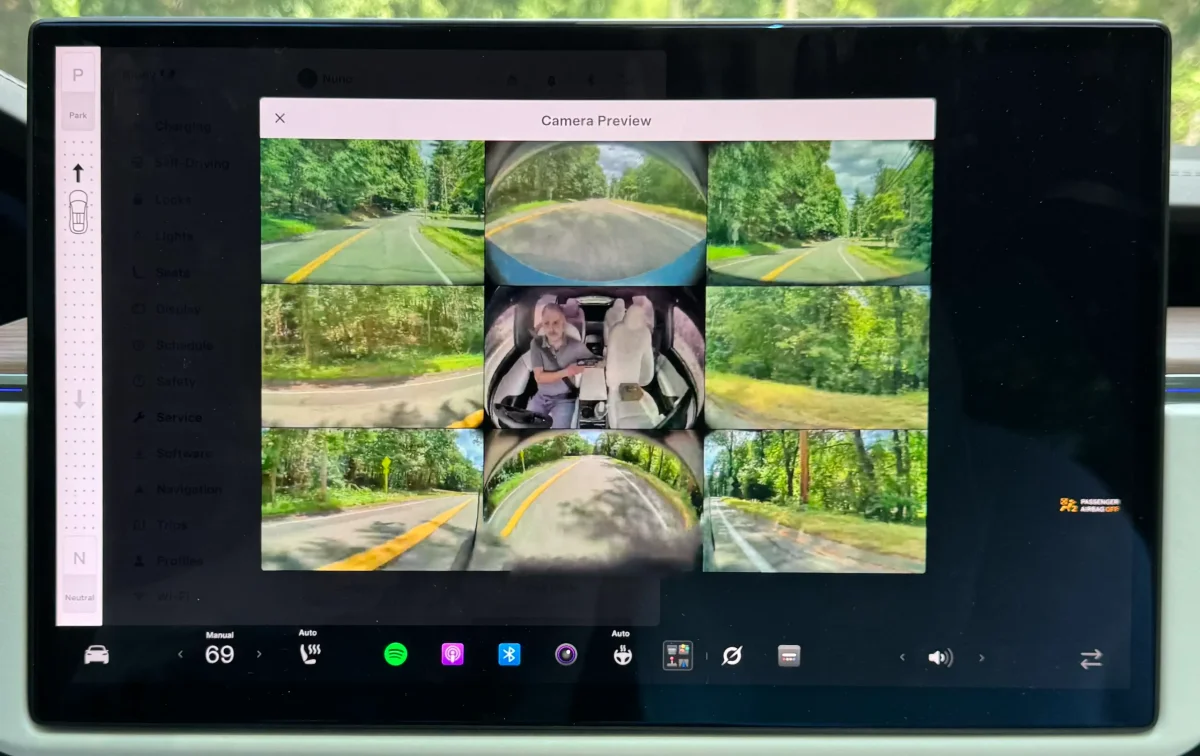
There’s a quiet tension built into every Tesla on the road today: nine cameras are constantly feeding the car’s Full Self-Driving brain a 360-degree picture of the world, yet the person behind the wheel can usually see only a sliver of that data on the center display. A buried diagnostic tool has always been able to surface all nine feeds at once, but with an obvious catch — the moment you shift out of Park, the grid vanished. That changed recently, and Tesla didn’t say a word about it.
IT-NEWS, June 22 — Every Tesla ships with nine cameras that supply visual data to the FSD system, enabling autonomous driving on both city streets and highways. Under normal conditions, the driver sees only a couple of these feeds — the standard reversing camera or the side repeater views that pop up automatically during turns. But a hidden diagnostic feature, which first appeared roughly three years ago in software version 2023.20, offers something far more complete: a multi-panel grid displaying every onboard camera feed simultaneously. Until now, that view locked itself the instant you moved the gear selector out of Park.
The latest software update has quietly loosened that restriction. Drivers can now keep the full nine-camera split-screen view active even while the vehicle is in motion. X user @realwhitakerb shared a video demonstrating the change — at regular road speeds, the center display seamlessly maintains a live grid of all nine camera angles. Tapping any individual feed expands it to full screen, and tapping a grid icon in full-screen mode returns you to the multi-panel layout.
IT-NEWS notes that accessing the feature still requires a slightly roundabout path. You have to navigate to Controls > Service while parked; the entry point only appears when the vehicle is stationary. But once you’ve pulled up the camera grid before shifting into Drive, the split-screen view persists throughout the journey. You can dismiss it manually at any point, though bringing it back mid-drive is not an option — you’ll need to come to a complete stop and shift back into Park.
The practical appeal is immediate. Instead of guessing whether road grime, glare, or condensation is degrading a particular camera’s image, the driver can glance at the grid and see exactly what every lens is capturing. Tesla already improved camera-obstruction warnings in FSD v14.3, adding clearer on-screen alerts when environmental factors interfere with hardware imaging, along with a new camera-cleaning guide tucked inside Service Mode to help owners properly maintain the forward-facing windshield cameras.
This unannounced software tweak turns what was once a garage curiosity into a genuinely useful diagnostic tool. The tidy nine-panel grid syncs feeds from the cabin camera, the A-pillar side cameras, the side repeater cameras, the rear camera, and the main forward-facing unit — all in one glance. The workflow may be a little clunky, requiring you to remember to launch the view before stepping on the accelerator, but the payoff is hard to ignore: whether you want to assess surrounding road conditions on a tricky stretch of highway or simply show someone the hardware that makes the car tick, it is a small feature that punches well above its weight.